Starting a solo medical practice: a practical systems guide
A first-patient-day systems guide for solo clinicians planning the business, enrollment, patient, clinical, revenue, and security workflows of a new practice.
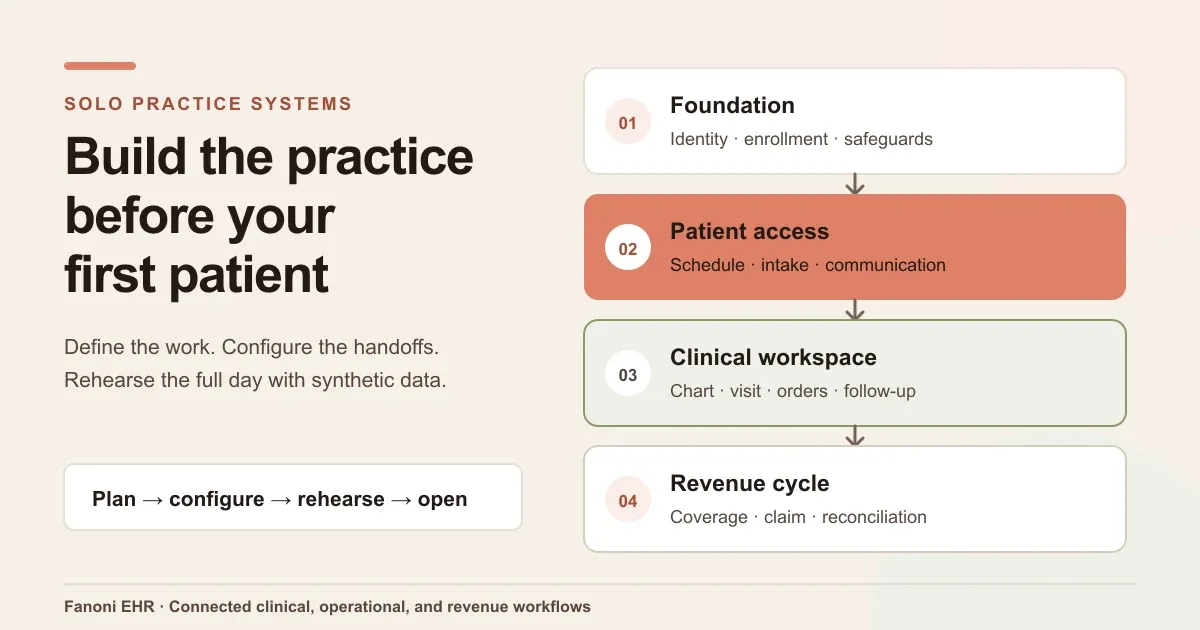
Starting a solo medical practice means designing several operating systems at the same time.
Before the first patient arrives, the clinician needs a defined practice model, the right business and professional approvals, a patient-access workflow, a clinical record, a way to coordinate follow-up, and a revenue process that can trace work from coverage through payment. Fanoni EHR can support the connected clinical, operational, and revenue workflow, but it does not replace legal formation, licensure, payer enrollment, accounting, or qualified privacy and security review.
In brief: build the practice around first-patient day. Establish the professional and business foundation, map identifiers and payer requirements, configure the patient and clinical workflow, prepare billing and follow-up, complete privacy and security work, then rehearse the full day with synthetic data before going live.
What should you prepare before starting a solo medical practice?
A solo medical practice needs more than an office, an EHR, and a billing account. It needs a controlled path from appointment request to documented visit, follow-up, claim or invoice, payment, and record retention. Each step should have an owner, an authoritative requirement, a configured system, and a test that proves the handoff works.
The exact requirements depend on the clinician's profession, specialty, state, ownership structure, services, payers, prescribing activity, and care setting. Physicians and other clinicians should confirm that independent ownership and practice are permitted within their licensure and scope before relying on a general startup checklist.
| Workstream | Decision to make | Evidence to retain | First-patient-day test |
|---|---|---|---|
| Practice model | Services, visit types, location, hours, staffing, and payment model | Approved service scope and operating assumptions | Can a representative visit move from request to follow-up? |
| Business foundation | Entity, tax, banking, insurance, licenses, and contracts | Formation, tax, license, policy, and adviser records | Are the contracting and billing identities consistent? |
| Identifiers and enrollment | Individual/organization identifiers, payer applications, and network status | Current applications, notices, effective dates, and contacts | Can staff explain which services can be billed to which payer on opening day? |
| Patient access | Scheduling, registration, consent, eligibility, communication, and records intake | Approved forms, scripts, policies, and routing rules | Can a synthetic patient register and receive the correct instructions? |
| Clinical care | Chart, documentation, orders, medications, results, referrals, and follow-up | Approved templates, protocols, connections, and sign-off rules | Can the clinician complete and sign a representative encounter? |
| Revenue cycle | Charge capture, claim or invoice, remittance, denial, and patient balance | Fee, payer, coding, submission, and reconciliation controls | Can a synthetic visit reach a reviewable financial state? |
| Privacy and resilience | Access, vendors, safeguards, downtime, backup, and incident response | Risk assessment, agreements, policies, tests, and training | Can the practice continue safely when a key system is unavailable? |
1. Define the practice model before choosing software
Start with the care the practice intends to deliver. Write down the specialty, patient population, in-person and virtual visit types, procedures, prescribing needs, expected labs or imaging, referral relationships, payer strategy, self-pay policy, location, hours, and any staff or contractors.
This is an operating model, not a slogan. It should answer practical questions:
- Which visit types can be scheduled on opening day?
- Which services require equipment, trained staff, consent, prior authorization, or outside partners?
- Which results need a closed-loop review process?
- Which messages require clinical triage rather than an administrative reply?
- Who covers urgent follow-up, inbox work, and downtime when the owner is unavailable?
- Which services will be billed to insurance, invoiced directly, or excluded until a later phase?
A focused opening scope is easier to configure and test than a long service list with unresolved dependencies. The goal is not to limit the practice permanently. It is to make the first version operationally clear.
2. Establish the business and administrative foundation
Business formation and professional practice authority are related, but they are not the same decision.
The U.S. Small Business Administration's launch framework includes structure, registration, tax identifiers, licenses, banking, and insurance. (SBA, Launch your business) The IRS describes an Employer Identification Number as a federal tax identifier and directs people forming a legal entity to register that entity with the state before applying for the EIN. (IRS, Employer Identification Numbers)
A medical practice may also need profession- and state-specific review of ownership, naming, supervision or collaboration, professional liability, facility requirements, laboratory activity, prescribing, employment, records, and patient notices. The applicable sequence can change with the clinician type and jurisdiction.
Create one controlled foundation file that identifies:
- the legal and billing names the practice will use;
- ownership and professional-practice approvals;
- federal and state tax identifiers;
- professional, facility, and controlled-substance registrations where applicable;
- liability and business insurance;
- banking, accounting, and payment responsibilities;
- contracts and business-associate relationships; and
- the qualified legal and tax professionals responsible for unresolved decisions.
Do not use an EHR configuration screen as the authority for these facts. Configure the system from the approved records after the underlying decisions are complete.
3. Map identifiers, payer enrollment, and credentialing
An identifier is not the same as permission to practice or approval to bill a payer.
CMS describes the National Provider Identifier as a unique 10-digit identifier for healthcare providers and requires its use in HIPAA standard transactions by covered healthcare providers. (CMS, National Provider Identifiers) An NPI does not carry a specialty or location and does not replace a professional license, payer enrollment, credentialing, contracting, or a payer's effective date.
For clinicians seeking Medicare enrollment, CMS provides a program-specific path that includes obtaining the applicable NPI and completing the Medicare application through PECOS. (CMS, Become a Medicare provider or supplier) Medicaid programs, commercial plans, workers' compensation, and other arrangements can use different applications, portals, documents, and timelines.
Build an enrollment matrix before accepting appointments that will be billed to a payer:
| Payer or program | Clinician/entity identifiers | Application status | Effective date | Services covered by the approval | Source and contact | Opening-day decision |
|---|---|---|---|---|---|---|
| Example only | Confirmed from source records | Draft / submitted / approved | Verified or pending | Exact approved scope | Current payer notice | Schedule, self-pay with consent, or hold |
Avoid treating “application submitted” as “approved.” Record the notice, effective date, service location, billing relationship, and any restrictions that control what the practice can represent to a patient and submit to the payer.
4. Choose the clinical system before forms and templates multiply
Select and configure the clinical workspace before each process develops its own document, spreadsheet, portal, or inbox.
For a solo practice, the system should support the actual clinical day:
- patient registration and identity review;
- scheduling and visit status;
- a longitudinal patient chart;
- encounter documentation and signature;
- orders, results, medications, and follow-up;
- referrals, documents, messages, and tasks;
- coverage and billing context; and
- role, access, audit, retention, and export requirements.
Ask vendors to demonstrate the exact workflow rather than a list of features. Can the clinician open the scheduled patient, review incoming records, document the visit, sign the note, place the necessary order, assign follow-up, and preserve the revenue context without reconstructing the case in another tool?
Connections deserve separate verification. Electronic prescribing, labs, imaging, clearinghouse services, eligibility, payment, fax, patient communication, and telehealth may depend on contracts, configuration, geography, specialty, payer support, or a named production environment. “The screen exists” and “the required connection is live for this practice” are different facts.
5. Design patient access and communication as one workflow
The patient's first experience often begins before the clinical record: a phone call, web request, referral, fax, portal message, or appointment link.
Map that path from first contact through arrival:
- How can a patient request care?
- What information is collected before scheduling?
- Which requests need clinical triage?
- How are identity, coverage, referral, authorization, and contact details checked?
- Which forms and notices must the patient receive?
- How are cancellations, urgent messages, records, and after-hours needs handled?
- Where does the conversation become part of the patient record or an assigned task?
Keep marketing communication separate from patient-care communication. Public forms, advertising platforms, analytics tools, and general messaging channels should not receive PHI merely because they are convenient. The practice should define which channels are approved for which purpose and how patient messages become reviewable work.
A solo clinician also needs coverage for the moments when clinical care and administration collide. A message may require an appointment change, medication review, referral follow-up, or urgent escalation. The workflow should make the next responsibility visible instead of leaving it in one person's memory.
6. Build the revenue cycle before the first claim
Revenue work starts before claim submission. It begins with the services the practice offers, the payer or self-pay arrangement, coverage and benefit information, documentation, coding responsibility, fees, patient communication, and the records needed to support the bill.
Define the lifecycle:
coverage → authorization when required → encounter → documentation → coding/charge review → claim or invoice → acknowledgement → remittance/payment → denial or balance follow-up → reconciliation
For every handoff, identify the accountable person—even if that person is initially the solo clinician—and the source record that proves the state. If billing is outsourced, decide which system owns claim status, remittance, denials, patient balances, and corrections. A vendor relationship does not remove the practice owner's need for visibility.
Do not assume that an EHR, clearinghouse, payer portal, and bank account will reconcile themselves. Test a representative workflow with synthetic data and verify identifiers, destinations, acknowledgements, roles, and exception handling before real billing begins.
7. Complete privacy, security, and downtime planning
Privacy and security are operating responsibilities, not checkboxes that software can complete for the practice.
HealthIT.gov states that the HIPAA Security Rule requires covered entities and business associates to conduct a risk assessment. The ONC and HHS Office for Civil Rights developed a Security Risk Assessment Tool for small and medium providers, while cautioning that using the tool does not guarantee compliance and is not legal advice. (HealthIT.gov, Security Risk Assessment Tool)
The practice's work should cover at least:
- who can access which systems and records;
- how accounts, devices, email, messaging, fax, remote work, and physical space are protected;
- which vendors handle PHI and which agreements and configurations apply;
- how data is backed up, retained, exported, corrected, and destroyed;
- what happens during internet, power, vendor, or device failure;
- how suspected incidents are reported and handled; and
- how access is changed when a contractor or staff member joins or leaves.
Use qualified privacy, security, and legal reviewers for the practice's actual environment. A vendor's security materials can support that review, but they do not replace the practice's own risk assessment or operating safeguards.
8. Rehearse first-patient day with synthetic data
Before opening, run the complete workflow with synthetic patients and representative visit types. A rehearsal should test both the expected path and the failures that are likely to happen.
Test whether the practice can:
- receive and triage a new-patient request;
- register the patient and capture approved forms;
- schedule or reschedule the appointment;
- verify the applicable payment or coverage path;
- open, document, sign, and close the encounter;
- place and track a representative order, referral, medication, result, or follow-up task;
- create the correct claim or patient invoice state;
- receive an acknowledgement, rejection, denial, or payment response;
- protect the record when the internet or a vendor is unavailable; and
- find the audit history and accountable owner for each decision.
Record every failure as a launch issue with an owner and retest date. Do not resolve a broken handoff with an informal workaround unless that workaround is approved, documented, and safe to operate.
How Fanoni EHR can support a solo practice
Fanoni EHR is a practitioner-facing FHIR R4 workspace designed to keep patient context connected across clinical care, practice operations, and revenue-cycle work.
| Solo-practice need | Relevant Fanoni EHR support | What must still be confirmed |
|---|---|---|
| Run the clinical day | Built patient registration, chart, schedule, encounter, orders, medication, documents, care-plan, and task surfaces | Specialty fit, templates, prescribing, lab, imaging, and other required connections |
| Coordinate patient access and follow-up | Built inbox, messages, tasks, faxes, referrals, telehealth, and outreach surfaces | Phone, fax, portal, consent, notification, and communication configuration for the practice |
| Keep revenue work connected to the record | Built insurance, eligibility, billing, claims, denials, payments, and prior-authorization surfaces | Payer, clearinghouse, payment, transmission, entitlement, and production-path availability |
| Use AI with review boundaries | Patient-specific advisory and workflow assistance where the product contract supports source viewing, human review, and auditability | The exact model, evidence, approval, clinical responsibility, and environment for each workflow |
| Operate a one-provider setup | Fanoni Lab can scope the EHR around a solo practice and one-provider workflow | Current plan, pricing, availability, migration, implementation, and add-ons for the exact practice |
Fanoni does not create the legal entity, determine whether the clinician may own or independently operate the practice, issue licenses or NPIs, approve payer enrollment, replace the practice's professional advisers, or guarantee reimbursement or readiness.
The useful product conversation begins with the first-patient-day workflow. Teams can review Fanoni EHR, review current plan and pricing scope, or book a personalized Fanoni EHR demo built around the practice they plan to open.
Questions to ask an EHR vendor before opening
- Can you demonstrate our representative visit from request through signed note and follow-up?
- Which capabilities are built, deployed, verified for our environment, gated, or planned?
- Which prescribing, lab, imaging, fax, telehealth, clearinghouse, payer, and payment connections are available for our location and specialty?
- How will our approved business, billing, service-location, and provider identities be configured and changed?
- How do we import records and export a complete, usable copy later?
- How do roles, authentication, audit history, backups, downtime, and incident responsibilities work?
- Where do patient messages, results, referrals, authorization work, and denials become assigned tasks?
- Which AI features use patient-specific data, what sources are shown, and who owns the final decision?
- What implementation work belongs to the vendor, the practice, and third parties?
- Which costs are subscription charges, add-ons, implementation services, transaction fees, or outside-vendor costs?
Frequently asked questions
Can any clinician open a solo medical practice?
No universal answer applies. Ownership, independent practice, supervision or collaboration, facility, prescribing, and scope rules depend on the clinician's profession and jurisdiction. Confirm the model with the relevant licensing board and qualified legal counsel before forming or marketing the practice.
Does a solo medical practice need an NPI?
CMS states that covered healthcare providers must obtain and use an NPI in HIPAA standard transactions. The applicable individual and organizational identifiers depend on the practice structure and transactions. An NPI does not replace a license, payer enrollment, credentialing, or contracting.
When should a solo practice choose an EHR?
Choose the clinical system after defining the practice model but before forms, templates, patient data, and work queues spread across disconnected tools. Leave enough time to verify integrations, configure approved records, train users, import necessary data, and rehearse representative workflows.
Can Fanoni credential and enroll the practice with payers?
Fanoni includes practice-administration and credentialing-related product surfaces, but software does not itself grant credentials or payer approval. The exact service, entitlement, workflow, and human responsibility must be confirmed. The practice remains responsible for authoritative applications, notices, contracts, and effective dates.
Does Fanoni include billing and prior authorization?
Fanoni EHR includes built revenue-cycle, billing, insurance, denial, and prior-authorization surfaces. The exact payer connections, submission channels, production status, configuration, and availability must be verified for the practice before relying on them.
Is Fanoni an all-in-one practice-launch service?
No. Fanoni EHR can provide the connected software workspace for clinical, operational, and revenue work. Legal formation, licensure, tax, payer enrollment, credentialing decisions, insurance, privacy and security review, facility readiness, and other professional services remain separate responsibilities.
Build the launch around the workflow
A solo practice becomes operational when its decisions and handoffs work together. That means approved identities, a schedulable service, a reviewable patient record, a signed clinical encounter, visible follow-up, a controlled revenue path, and a tested response when something fails.
Fanoni can help map and configure that connected workflow around the practice you are building.
Book a personalized Fanoni EHR demo · Review current Fanoni EHR plans
This article is educational and does not provide legal, tax, licensing, credentialing, reimbursement, privacy, security, or clinical advice. Requirements vary by profession, specialty, payer, service, entity, jurisdiction, and practice. Verify current authoritative requirements and obtain qualified professional review before acting.